
Let’s Create Your New NCMS Portal Login!
A new platform designed to make it easier to manage your membership, make donations, access resources, register for events, update your information, and stay connected with NCMS.
Important Notices Before You Begin:
- If you previously had recurring payments set up for your NCMS membership or recurring contributions to the NCMS PAC or NCMS Foundation, those payments have ended and did not transfer to the new platform. To continue recurring payments or contributions, you will need to set them up again through the new portal.
- All users must locate their existing record and create a new portal login, as login credentials from the previous system did not transfer. Even if you did not previously have an account, your record may already exist in our system. Follow the steps below to ensure your existing record is properly connected to your new portal login.
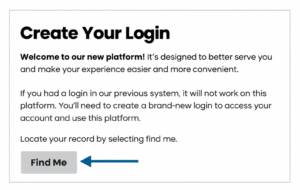
1. Click “Find me” – This will take you to the search page where you can locate your record in our new system.
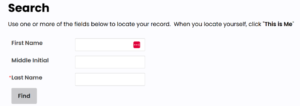
2. Locate your record – Use one or more of the search fields to find your record. Once you’ve entered your information, click Find.
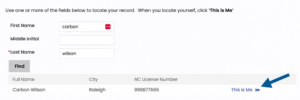
3. Confirm your record – Once you locate yourself in the search results, click “This is Me.”
4. After selecting “This is Me,” you’ll see the email address associated with your record on the left side of the page. This email address will be your username. Use this email to continue setting up your login.
If your email address that we have on file is shared with another person, is inactive, incorrect, or you no longer have access to it, you may run into issues completing your login setup. If any of these apply to you, please contact 919-833-3836 or kwilson@ncmedsoc.org.
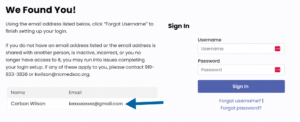
5. Click “Forgot username”
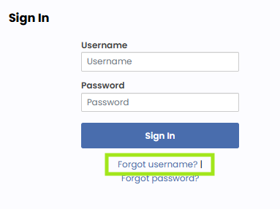
6. Enter the email address associated with your record, then click “Submit”.
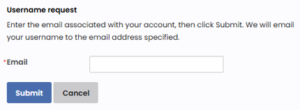
7. Email notification: You will receive an email from us that will contain your username and a link to set your new password. Remember to check your junk folder for the email. If you do not receive the email, please contact us.
8. Enter your new password, confirm, and click “Submit”.
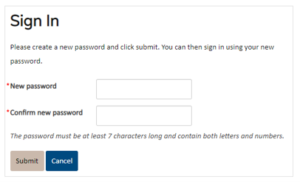
You will now be able to sign in using your email and new password. You will be taken to your personal landing page where you will find information specific to you.
Questions?
If you have questions regarding the new system or your membership, please contact: kwilson@ncmedsoc.org